AI Calling for Lead Qualification: How to Scale Outbound Screening Without Crowding Your Team
Every market center experiences a specific baseline friction point: the gap between capturing a lead and establishing real human contact. Marketing teams spend considerable budget launching targeted lead generation campaigns across digital ad networks. Yet, the moment a hot lead fills out a form, the clock starts ticking against conversion probabilities.
If your internal sales team takes thirty minutes, an hour, or an entire day to place a manual follow-up call, the prospect’s intent has already cooled down. In many cases, they have already moved on to a competitor who responded faster.
[The Response Window Reality]
0-5 Seconds: Peak Intent ➔ 90% Conversion Probability
5-30 Minutes: Intent Drops ➔ 50% Conversion Probability
1-24 Hours: Lead Rot Sets In ➔ <10% Connection Probability
For scaling businesses, fixing this problem by simply hiring more human callers creates a massive administrative burden. Manual lead verification is a major time sink. Reps spend hours dialing invalid numbers, navigating busy signals, and dealing with unqualified inquiries.
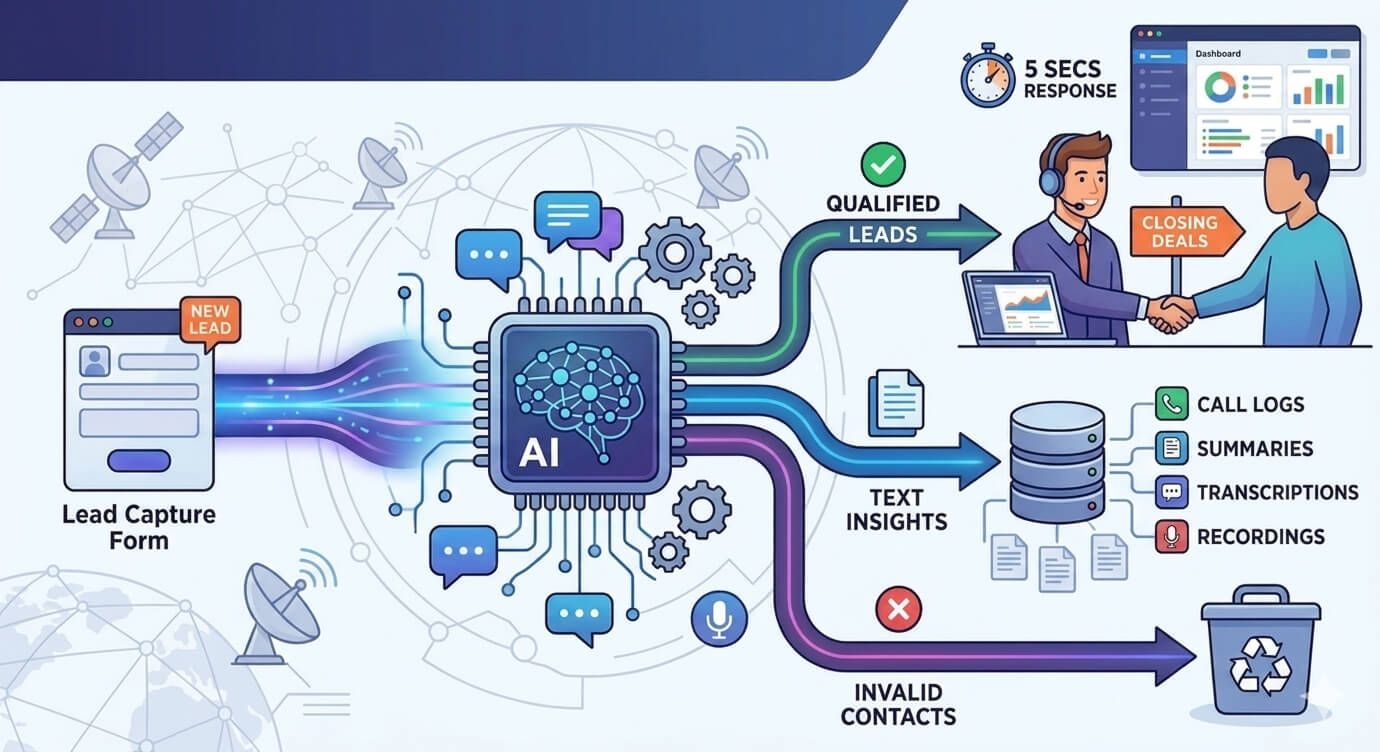
Using AI calling for lead qualification offers a practical way to scale your outreach. By placing automated, low-latency screening calls within seconds of a lead submission, businesses can automatically verify intent, filter out dead leads, and route pre-qualified opportunities directly to their human sales desk.
What Is AI Calling for Lead Qualification?
To implement this technology successfully, it is important to understand what conversational voice AI actually is—and what it is not.
Defining Voice AI Screening Entities
AI calling for lead qualification uses responsive, context-aware speech-to-text (STT), natural language processing (NLP), and text-to-speech (TTS) engines to run natural, two-way conversations with inbound prospects. Unlike rigid, pre-recorded Interactive Voice Response (IVR) menus that force users to press buttons on a keypad, conversational AI listens to human speech, interprets intent, and responds contextually in real-time.
Outbound Screening vs. Traditional Cold Robocalls
Automated voice screening should never be confused with spammy cold robocalls. Robocalling blasts unverified phone lists with generic, un-targeted recordings.
In contrast, automated lead qualification calls are strictly event-driven. They trigger only when a user explicitly submits their contact details onto an organization's landing page or ad capture form. The call functions as an instant, helpful confirmation assistant that verifies the user's inquiry, answers basic structural questions, and collects essential qualification data.
The Hidden Friction: Why Manual Lead Validation Stalls Growth
Relying entirely on manual operations to filter incoming lead volumes introduces two major bottlenecks that slow down your sales pipeline:
1. The Dilution of Speed-to-Lead Timelines
Human teams cannot sit by a screen twenty-four hours a day waiting to catch leads the exact second they fill out a form. If a lead registers at 11:00 PM, they sit unaddressed in a database until the following morning. Automated voice screening systems solve this lag by running around the clock, ensuring that high-intent prospects receive a follow-up call within five seconds of submission—no matter when they submit their details.
2. Rep Burnout from Chasing Dead Contact Numbers
Up to 40% of standard inbound lead lists contain invalid numbers, wrong entries, or dead lines. Forcing a high-salaried human closer to manually dial through these junk rows wastes their time and kills team morale.
By using an automated screening layer to handle initial dials, your human reps never have to listen to a ringing phone or deal with disconnected lines. The automation handles the heavy lifting of cold outreach, cleaning up your database so your team can focus exclusively on highly qualified prospects.
How Automated Voice Screening Fits Into an Omnichannel Sales Workspace
A standalone voice tool that doesn't talk to the rest of your tech stack creates isolated data silos. To drive real business growth, your automated calling infrastructure must sit inside a unified, omnichannel sales communication workspace.
[Omnichannel Workspace Architecture: Rapid Sales]
Lead Capture ➔ Instant 5s Voice AI Screening ➔ Inbound Reply Detected
│
➔ (All Campaign Channels Pause) ➔ Unified Rep Dashboard View
This is the exact design methodology behind the Rapid Sales platform. Instead of forcing companies to run separate tools for messaging, email outreach, and phone auditing, Rapid Sales unifies all outbound communication loops into one central dashboard.
Synchronizing the Text and Voice Follow-Up Streams
When an automated qualification call is executed, the results must update your messaging and email channels instantly. For example, if the voice engine contacts a prospect and marks them as Interested, your background WhatsApp and email drip sequences must pause automatically to prevent sending robotic, out-of-context follow-ups. Centralizing text, email, and voice channels into a single dashboard ensures that your brand presents a clean, professional image across every touchpoint.
Keeping Data inside a Unified Local Workspace
Operating within a single, local workspace ensures complete data compliance. With the Rapid Sales platform, all interaction logs, chat histories, and voice recordings are hosted securely on local servers. This structural data safety protects corporate intellectual property while aligning perfectly with modern data residency regulations.
Managing Voice Insights: Logs, Summaries, Transcripts, and Recordings
Automating phone calls shouldn't mean losing visibility into customer conversations. Managers need clear, scannable insights to track performance and evaluate campaign success. The Rapid Sales dashboard provides this transparency through four synchronized analytical layers:
1. AI Call Logs and Operational Verification
The system builds a clean, automated chronological call log for every contact record. This overview tracks exact dial timestamps, connection states (e.g., Completed, No-Answer, Busy), and total conversation runtimes, giving managers immediate visibility into pipeline activity.
2. AI Call Summaries: Turning Audio into Actionable Text
Busy business owners and sales leads don't have the time to sit through hours of raw audio files just to understand what happened during a call. Rapid Sales automatically extracts short, bulleted call summaries for individual contact timelines. This allows team leads to skim key conversation takeaways and understand buyer intent in under five seconds.
3. AI Call Transcriptions: Line-by-Line Text Records
When your team needs to review exact statements or check price agreements, the system provides a searchable, line-by-line text transcript of the conversation. These text records capture every detail of the call, making it easy to audit interaction quality without playing back audio files.
4. Secure Call Recordings for Quality Compliance Auditing
For comprehensive quality control, full call recordings are stored securely inside individual contact cards. Authorized users can access an integrated media player to listen to call recordings anywhere, making it easy to train reps, resolve disputes, and maintain compliance standards across your sales operations.
Best Practices for Implementing AI Calling in Your Outbound Workflow
To maximize conversion rates and build trust with prospects, keep these practical operational rules in mind:
Clear Fact Anchoring and Objective Prompt Rules
When setting up conversational prompts for your voice assistant, keep its focus locked onto factual parameters. The agent must never guess or invent numbers. Ensure its script is anchored to your actual business figures (such as hardcoded platform prices or standard implementation timelines). Additionally, program the model to ask exactly one question per turn to keep the call feeling like a natural, helpful human conversation.
Smooth Hand-offs to Human Closing Teams
Always remember that the primary goal of AI calling for lead qualification is to set up a successful human connection. The voice agent shouldn't try to close complex enterprise contracts on its own. Instead, it should focus on checking initial interest, verifying requirements, and scheduling a deep-dive meeting.
The moment the voice system marks a prospect as qualified, the dashboard must alert your team immediately, ensuring your human sales closers can step in with full contextual awareness to seal the deal.