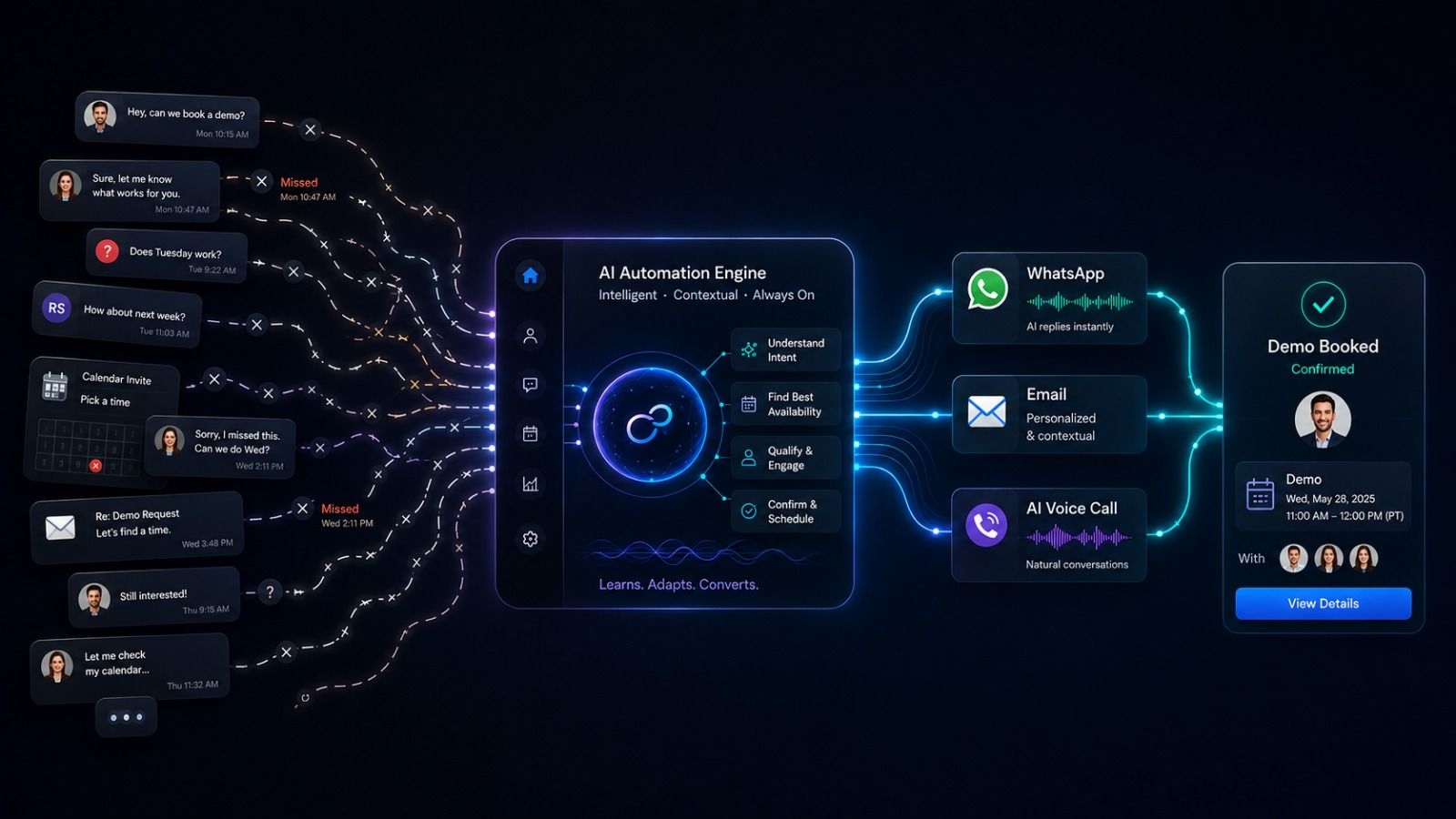
Step-by-Step: Automating Your Demo Booking Process
How do you automate the demo booking process?
Automating the demo booking process requires shifting from manual email replies to a triggered, omnichannel workflow. When a prospect requests a demo, an automated system immediately sends a WhatsApp message containing a direct calendar link, followed by a formal email. If the prospect does not choose a time within 24 hours, an AI voice agent automatically calls them to answer preliminary questions and secure the appointment on the spot.
In B2B sales, securing a meeting is often the hardest part of the entire sales cycle. A prospect visits your website, reads your landing page, and clicks "Request a Demo." Your marketing team celebrates.
But then, the friction begins.
A sales development representative (SDR) emails the prospect hours later: "Thanks for your interest! Are you free on Tuesday at 2 PM?" The prospect replies the next day: "No, Tuesday is packed. How about Thursday?" The SDR replies: "Thursday is booked for me. Does Friday morning work?"
By the time Friday arrives, the prospect has lost interest, found a competitor, or simply ghosted the email chain. This phenomenon is known as "Calendar Tag," and it destroys your inbound conversion rates. To maximize your pipeline, you must eliminate human friction and automate your demo booking process entirely.
The Friction of Manual B2B Scheduling
The modern B2B buyer demands instant gratification. When they decide they want a software demo or a consultation, their intent is at its absolute peak in that exact second.
Every minute you delay your response, and every extra email you make them read to schedule a time, drastically reduces the probability that the meeting will actually happen. Relying on human sales reps to manually monitor inboxes, calculate time zone differences, and send calendar links creates an operational bottleneck that costs businesses thousands of dollars in lost revenue.
How Automation Fixes the Drop-Off
Automating your demo booking process does not mean sending a generic, robotic auto-responder. It means using intelligent, multi-channel communication to engage the buyer on their preferred platform the moment they raise their hand.
By integrating your calendar directly with WhatsApp business automation, email sequences, and AI voice agents, you can secure the meeting while the prospect is still looking at your website.
The 3-Step Automated Demo Booking Workflow
Here is the exact step-by-step blueprint that fast-growing B2B and SaaS companies use to automate their scheduling processes:
Step 1: The Instant WhatsApp Qualifier (Minute 0)
Email is too slow for the initial touchpoint. When the inbound form is submitted, your CRM should instantly trigger a WhatsApp message to the prospect. WhatsApp boasts a 90%+ open rate, ensuring your message is seen immediately.
The Strategy: Keep it casual, helpful, and frictionless.
- Message Template: "Hi [Name], thanks for requesting a demo of our platform! To bypass the back-and-forth, you can pick a time that works perfectly for your schedule right here: [Calendar Link]. Let me know if you have any questions before the call!"
Step 2: The Formal Email Backup (Hour 1)
Not every executive uses WhatsApp for business, so you must secure your bases with a formal email. This email serves as a system of record and allows you to provide a bit more context about the upcoming call.
The Strategy: Reiterate value and provide the link again.
- Message Template: "Hi [Name], following up on your demo request. I’ve attached a quick 1-pager on how we typically help companies in [Their Industry] solve [Pain Point]. You can lock in a time for us to chat via my calendar here: [Calendar Link]. Looking forward to it!"
Step 3: The AI Voice Follow-Up (Day 2)
If 24 hours pass and the prospect has not clicked the calendar link in either the WhatsApp message or the email, they have likely gotten distracted. A human SDR would typically just send another email. An automated system deploys a conversational AI voice agent.
The Strategy: Use AI to handle objections and book the call via phone.
The AI caller dials the prospect automatically: "Hi [Name], this is the automated assistant for the Rapid Sales team. I saw you requested a demo yesterday but haven't had a chance to pick a time. I can actually schedule that for you right now—are you free tomorrow afternoon?" The AI logs the response, syncs with the calendar, and generates an instant transcript for the human sales rep.
Eliminating "No-Shows" with Automated Reminders
Booking the demo is only half the battle. B2B sales teams suffer heavily from "no-shows"—prospects who book a time but forget to attend the Zoom call.
Your automated scheduling workflow must include a robust reminder cadence. Relying on standard email calendar invites is no longer sufficient. You must incorporate WhatsApp nudges:
- The 24-Hour Nudge: "Hi [Name], looking forward to our demo tomorrow at [Time]. Here is the meeting link!"
- The 1-Hour Nudge: "Hi [Name], we are chatting in an hour! Let me know if you need to reschedule."
These automated text reminders can reduce your no-show rate by up to 50%.
The Power of the "Stop-on-Reply" Engine
When you build a workflow that utilizes WhatsApp, email, and AI voice calls simultaneously, you must protect the customer experience.
If a prospect receives your Day 1 WhatsApp message and replies, "Thanks, I just booked a time for Thursday," your automated system must instantly recognize that success. A sophisticated CRM features a cross-channel "Stop-on-Reply" engine. The moment the booking is confirmed or the prospect replies, all future automated follow-up emails and AI calls are instantly paused, preventing your brand from looking uncoordinated.
Automate Demo Bookings with Rapid Sales
You do not need to stitch together complex Zapier webhooks to build this workflow.
Rapid Sales provides a unified, all-in-one sales communication platform designed to turn inbound interest into confirmed calendar meetings instantly. With our native WhatsApp API, automated email sequences, and conversational AI voice agents, you can build flawless demo booking workflows from a single dashboard.
Rapid Sales logs every interaction on a unified customer timeline and utilizes a smart stop-on-reply engine to ensure your outreach remains professional, responsive, and highly effective.
Stop playing calendar tag with your hottest leads. Book a Rapid Sales demo today and see how our automation fills your sales calendar effortlessly.